Cloud Outages Are Inevitable. Is Your Business Prepared?
Earlier this week, AWS experienced a limited service disruption in one of its eastern U.S. regions. Social media feeds lit up—some voices were outraged, others seized the moment to criticize, and the uninitiated were simply surprised. The truth is that while these events are rare, they do occur. Every service provider is susceptible. As a consumer of services directly or indirectly affected, your options are limited. But as a business, you should be prepared. The financial, reputational, and operational costs of an outage can be substantial. Resilience underpins the internet, yet it remains a choice you must actively make for your solutions, whether they run on AWS, Azure, any other cloud, or in your own data center.
Well-Architected as a Choice
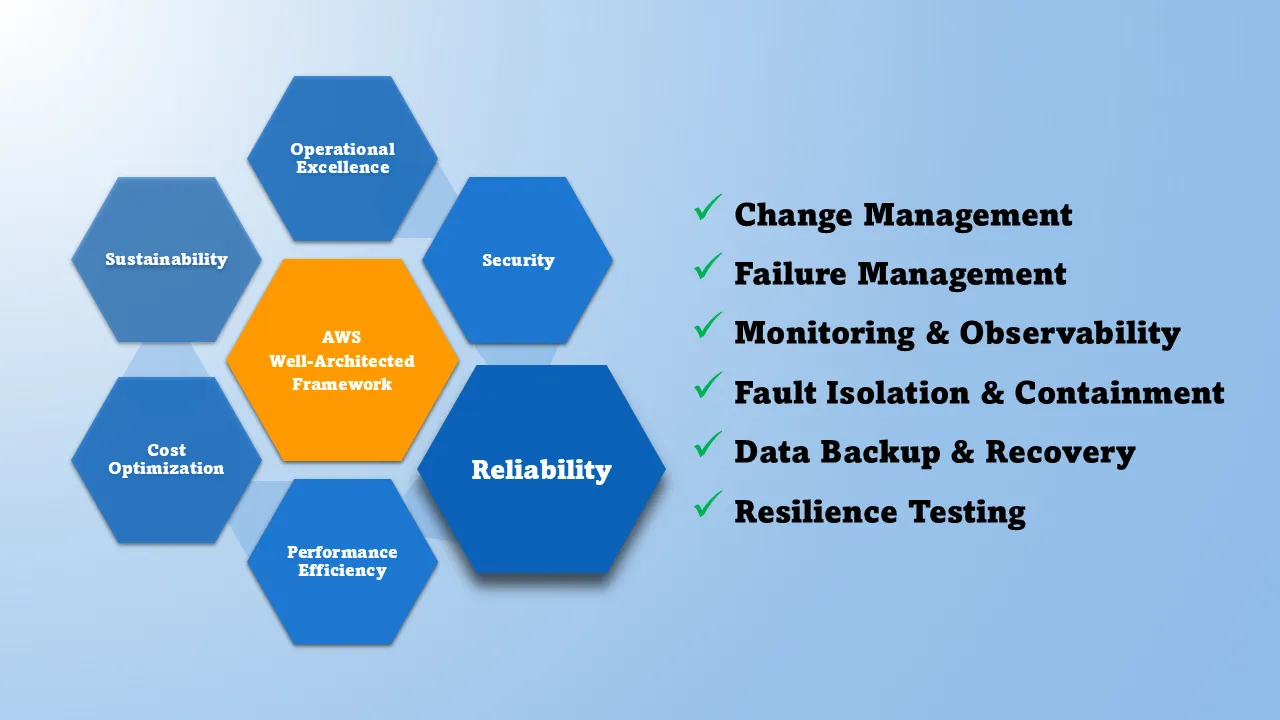
AWS, like the other leading cloud providers, provides a Well-Architected framework that guides you in building the right solutions in the cloud. Reliability is a foundational pillar of the AWS Well-Architected Framework, and at the core provides this guidance:
Resiliency is a shared responsibility between AWS and you […]
AWS is responsible for resiliency of the infrastructure that runs all of the services offered in the AWS Cloud. […] AWS uses commercially reasonable efforts to make these AWS Cloud services available, ensuring service availability meets or exceeds AWS Service Level Agreements (SLAs) […]
Your responsibility is determined by the AWS Cloud services that you select. This determines the amount of configuration work you must perform as part of your resiliency responsibilities. […] DR strategies may also make use of multiple AWS Regions. For example, in an active/passive configuration, service for the workload fails over from its active Region to its DR Region if the active Region can no longer serve requests.
All major cloud providers organize their infrastructure into regions—clusters of data centers in specific geographic locations. AWS operates regions in Northern Virginia, Ohio, Ireland, Tokyo, and dozens of other locations across six continents.
Regions are separated by significant distances and connected through dedicated, high-speed networks. Each region operates independently, so issues in one region don’t cascade to others. The map below shows AWS regions globally, color-coded by geographic area:
Within each region, AWS operates multiple Availability Zones—physically separate locations, each with independent power, cooling, and network infrastructure. These zones are close enough to maintain low-latency communication between them (crucial for performance) but far enough apart that a localized event like a power outage or natural disaster won’t affect multiple zones simultaneously.
Each Availability Zone contains one or more physical data centers with redundant power, networking, and connectivity systems, housed in separate facilities.
So Much Redundancy, What Could Possibly Go Wrong?
Given everything described above—multiple regions, multiple zones per region, multiple data centers per zone, all with redundant power and networking—you might reasonably wonder how an outage happens at all. The infrastructure looks bulletproof. And yet, outages still occur.
The specific root cause of any given incident matters less than understanding a fundamental point: all that redundancy exists in the infrastructure, but resilience in your application isn’t automatic. What matters is knowing what AWS delivers by default, which configuration choices are yours to make, and where your responsibility begins.
Here are the important points:
-
The Region: When you deploy to AWS, you select which geographic region will host your application. This choice typically depends on where your customers are located—proximity reduces latency and improves performance.
- You might select a different region if your preferred location doesn’t offer the services you need, since AWS rolls out new capabilities on a region-by-region basis, or because compliance requirements mandate data residency in specific jurisdictions.
-
The Zone: Each region contains multiple Availability Zones—the physically separate locations described above, each with independent infrastructure.
- When you deploy a service, you can choose to use a single zone or spread across multiple zones within your region.
- Not all AWS services support multi-zone configurations automatically.
-
The Multiplier: Multi-zone and multi-region deployments improve resilience but increase both cost and operational complexity. You’re running and paying for redundant infrastructure.
- Some AWS services make multi-zone deployment straightforward (a configuration option), while others require more significant architectural work.
- Very few services support automatic cross-region deployment by design. Regional isolation is a deliberate choice that maximizes fault tolerance—tight coupling across regions could undermine resilience.
So, while AWS provides a very resilient and battle-tested platform, solutions deployed on AWS do not automatically become resilient to every outage scenario (whether the issue is internal to AWS or external). Resiliency is a shared responsibility regardless of your platform choice.
Resilience and Reliability on a Spectrum
Building resilience doesn’t require massive upfront investment. Most organizations progress through predictable stages, making incremental improvements to their architecture as their needs evolve.
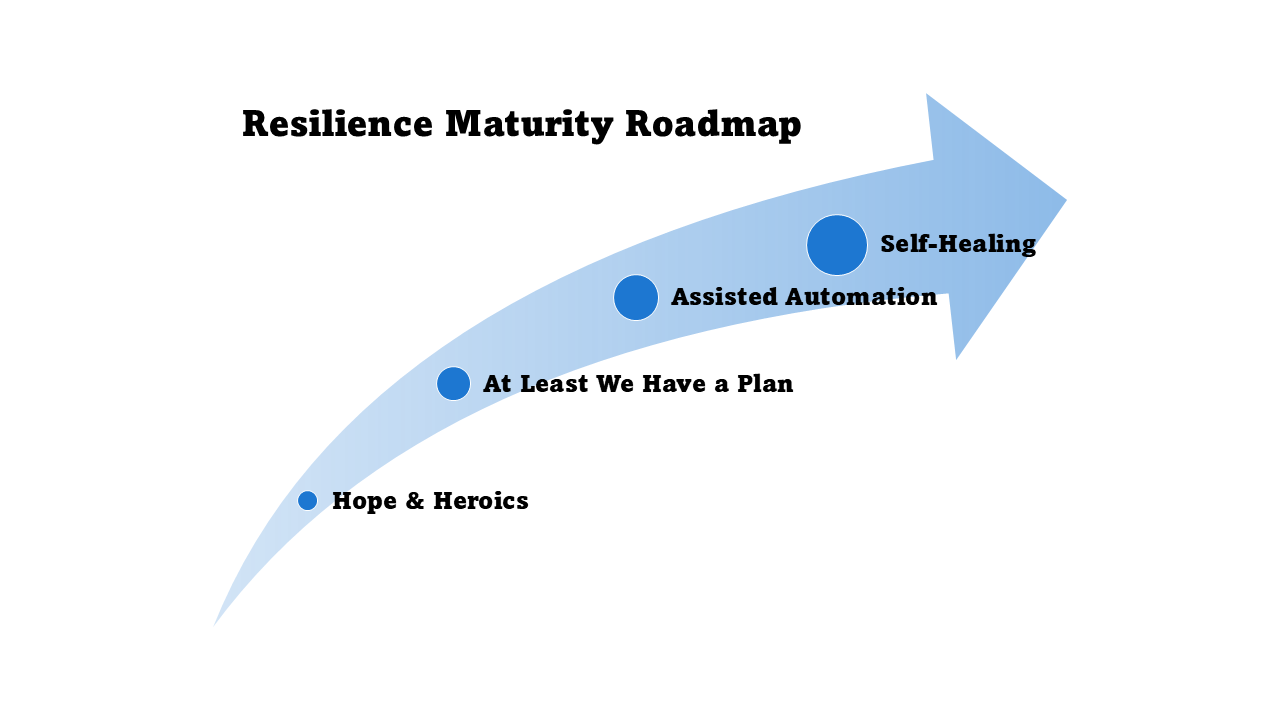
For most organizations, the path to resilient cloud workloads follows four stages:
- Stage 0 – Hope & Heroics: No documented playbooks. The plan is Slack, smart people, and luck. Downtime is chaotic and customer updates lag.
- Stage 1 – At Least We Have a Plan: Runbooks exist, stakeholders know who is on point, but failover steps remain mostly manual. Teams coordinate faster and communication stays consistent.
- Stage 2 – Assisted Automation: Core scenarios trigger scripted responses, observability drives action, and chaos tests happen regularly. Mean time to recover shortens as toil drops.
- Stage 3 – Self-Healing: Multi-region or multi-account patterns plus automated runbooks keep workloads steady, and human involvement becomes exception management, not firefighting. Incidents often resolve before customers notice.
Each stage represents a conscious trade-off between cost, complexity, and protection. Not every workload needs Stage 3 resilience. The goal is to match your architecture to your actual business requirements.
Process and Planning to Stage 1
Reaching Stage 1 means documenting your response plan before the next incident. You’re still running in a single region, potentially even a single zone, but you’ve thought through what happens when things break.
Key steps to formalize your plan:
- Document your current architecture: Map out which services run in which zones and regions, what depends on what, and where your single points of failure exist.
- Identify critical workloads: Determine which services absolutely cannot go down and which can tolerate brief outages. Not everything needs the same level of protection.
- Create recovery runbooks: Document the manual steps to restore service—how to fail over to a different zone, how to restore from backups, who has access to what. Include specific AWS console steps or CLI commands.
- Define ownership and communication: Assign who responds to what type of incident, who updates customers, and who has authority to make critical decisions during an outage.
- Test your assumptions: Run a tabletop exercise where you walk through a zone failure. Do your runbooks actually work? Do people know where to find them?
Script Your Way to Stage 2
Stage 2 is where you start automating the recovery steps you documented in Stage 1. You’re likely running multi-zone now, and you’re adding the automation and monitoring to make that architecture actually work during failures.
Steps to build assisted automation:
- Enable multi-zone configurations: For your critical services, enable multi-AZ deployments. For RDS databases, this might be checking a box. For EC2-based applications, this means running instances across multiple zones with a load balancer distributing traffic.
- Set up health checks and automatic failover: Configure load balancers, Auto Scaling groups, and Route 53 health checks so traffic automatically stops flowing to unhealthy zones. These are AWS-managed features you configure once.
- Automate data replication: Ensure databases replicate across zones (RDS Multi-AZ, DynamoDB global tables) and backups run on schedule. Test restores regularly—a backup you’ve never restored is just optimism.
- Build observability: Set up CloudWatch alarms that detect when a zone is degraded, when failover occurs, or when you’re running on reduced capacity. Alert on conditions that require action, not just informational noise.
- Test failure scenarios: Use AWS Fault Injection Simulator or simply terminate instances in one zone to verify your multi-zone setup actually works as designed. Don’t wait for a real outage to discover misconfigurations.
Introduce Self-Healing at Stage 3
Stage 3 is multi-region resilience with automated failover. This is expensive and complex—most organizations only do this for their most critical workloads. You’re protecting against the scenario where an entire AWS region becomes unavailable.
What multi-region architecture involves:
- Run workloads in multiple regions: Deploy your application stack in at least two regions. This doesn’t necessarily mean both regions are actively serving traffic (active-active). Many organizations use a warm standby approach where the secondary region has infrastructure provisioned but scaled down, only scaling up when needed for failover. This reduces costs while still enabling relatively fast recovery.
- Replicate data across regions: Use services like DynamoDB global tables, Aurora global databases, or S3 cross-region replication to keep data synchronized. Understand the consistency trade-offs—cross-region replication is typically asynchronous, meaning you may lose some data in a regional failover.
- Implement traffic routing: Use Route 53 with health checks and failover routing policies to automatically direct users to the healthy region. Configure this carefully—incorrect DNS settings can make things worse during an incident.
- Automate deployment and configuration: Use infrastructure-as-code (CloudFormation, Terraform, CDK) to ensure both regions stay configured identically. Manual drift between regions will cause failures when you need failover to work.
- Test regional failover regularly: The only way to know multi-region failover works is to actually fail over. Schedule planned failover exercises where you intentionally shift traffic between regions to validate the entire process.
Multi-region deployment is justified when the business impact of a regional outage—lost revenue, regulatory penalties, reputational damage—exceeds the significant ongoing cost of running everything twice.
Bottom Line
Most teams don’t know where to start. Getting started might be simpler than you think—you don’t need to boil the ocean. Start with an assessment of where you are, then build a pragmatic roadmap. A resilience strategy can feel optional until the day it is essential. For some organizations, the costs of failure far exceed the investment in preparedness.
Our team has helped many organizations—from startups to small and mid-sized businesses—get started. Often, the first step is a Well-Architected Review. It takes only a few days and helps you establish that starting point in your organization’s journey. We determine eligibility for a complimentary review based on workload readiness and scope, ensuring the engagement creates immediate value.
Request an AWS Well-Architected Assessment
Contact UsIdentify risks and build a roadmap to optimize your cloud infrastructure
Get a comprehensive assessment of your AWS infrastructure against industry best practices. Our AWS Well-Architected Review evaluates your cloud environment across six critical pillars:
- Operational Excellence - Run and monitor systems to deliver business value
- Security - Protect information, systems, and assets
- Reliability - Ensure workloads perform their intended functions
- Performance Efficiency - Use computing resources efficiently
- Cost Optimization - Avoid unnecessary costs
- Sustainability - Minimize environmental impacts
Complimentary engagements are available for qualifying workloads. We’ll evaluate your readiness and confirm availability before scheduling so expectations stay aligned while we help you identify risks, uncover opportunities for improvement, and create a prioritized roadmap for optimization.
Our certified AWS Solutions Architects will work with your team to review your current architecture, identify gaps, and provide actionable recommendations tailored to your business needs.
Complimentary assessments are offered at Polymath discretion for qualifying workloads. Contact us to confirm availability.
As part of the Well-Architected Review assessment offering, Polymath Services performs a current state assessment of the six pillars of the AWS Well-Architected Framework:
- Operational Excellence: streamline operations with runbooks, observability, and continuous improvement loops.
- Security: protect data and workloads through least-privilege access, detective controls, and automated guardrails.
- Reliability: architect for fault isolation, recovery strategies, and change management that prevent cascading failures.
- Performance Efficiency: match resources to workload demand, optimize architecture patterns, and monitor to avoid bottlenecks.
- Cost Optimization: balance capability with spend by rightsizing, adopting managed services, and leveraging pricing models.
- Sustainability: reduce environmental impact with efficient architectures, scaling policies, and workload observability.
If you are either not on AWS or are partially on AWS and would like to discuss how migrating to AWS could help you build better resilience, our migration and modernization services are specifically designed for that. We typically start with an AWS Migration Readiness Discovery to validate scope, surface risks, and prioritize the first wave of workloads. For certain scenarios and/or workloads, AWS funding may be able to offset the cost of migration. Funding decisions and disbursement are handled by AWS; we support you in preparing the strongest possible case.
Schedule an AWS Migration Readiness Discovery
Start DiscoveryValidate migration goals, surface blockers, and plan next steps
Tap into a no-cost, 60-minute discovery to confirm whether an AWS migration is worth pursuing now. We listen to your goals, understand the workloads in play, and note the stakeholders and constraints that will influence your path forward.
After the call, we send a short recap with our observations and suggested next moves. If AWS incentives could accelerate the plan, we flag the opportunity and outline how to explore it. The discovery is free for qualified prospects—we’ll confirm during intake.